![Altius Logo_Horz.png]](https://help.altius-group.com.au/hs-fs/hubfs/Altius%20Logo_Horz.png?height=35&name=Altius%20Logo_Horz.png)

Overview: Dashboard Sections
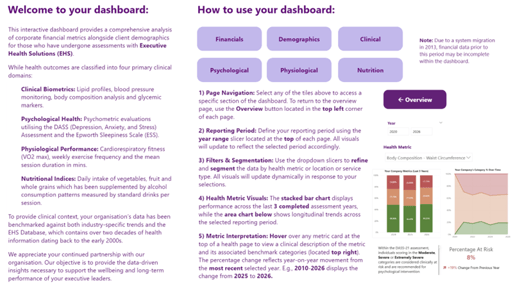
Section 1 – Overview
This section introduces the purpose of the dashboard and provides guidance on how to navigate and use it effectively. It also includes background context on the underlying data powering the dashboard.
Section 2 - Financials
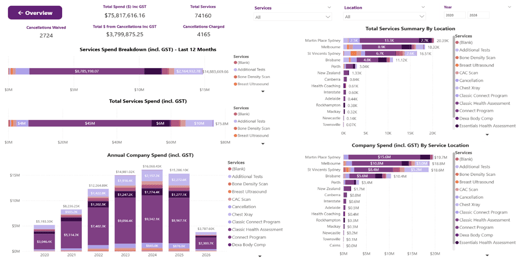
This section provides a comprehensive view of all the services utilised by your organisation, which includes the location of each service. Key financial metrics are presented here, such as total spend, cancellations charged and waived and total revenue from cancellations.
Section 3 - Demographics
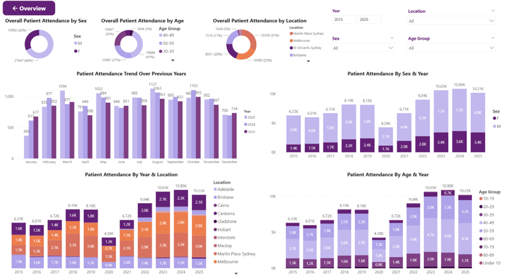
This section presents the demographic profile of individuals from your organisation who have undergone assessments. Data can be explored across three demographic dimensions: Age Group, Sex and Location. A year slicer is available, allowing all filters to be applied in combination to view data from a specific perspective.
Section 4 Clinical
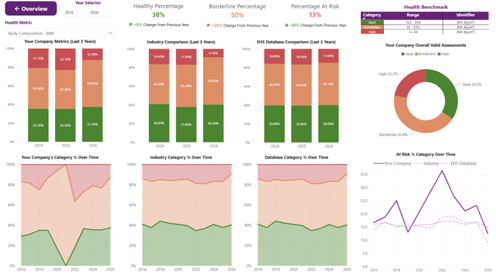
This section presents the clinical profile of individuals from your organisation who have undergone assessments. Data can be explored across key health indicators including Lipid Profiles, Blood Pressure, Body Composition and Glycemic Markers. A year slicer is available to view clinical outcomes from a specific perspective.
Section 5 Psychological
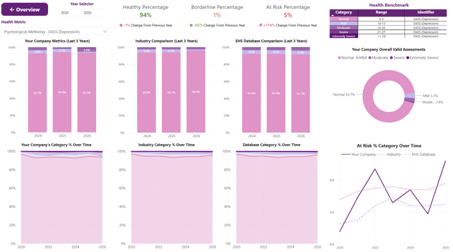
This section presents the psychological profile of individuals from your organisation who have undergone assessments. Data can be explored across psychometric outcomes from DASS and the Epworth Sleepiness Scale. A year slicer is available to view psychological outcomes from a specific perspective.
Section 6 Physiological
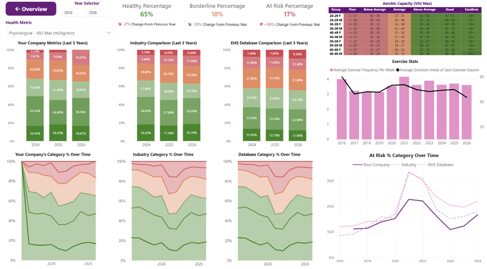
This section presents the physiological profile of individuals from your organisation who have undergone assessments. Data can be explored across VO₂ max, weekly exercise frequency and mean session duration. A year slicer is available to view physiological outcomes from a specific perspective.
Section 7 Nutrition
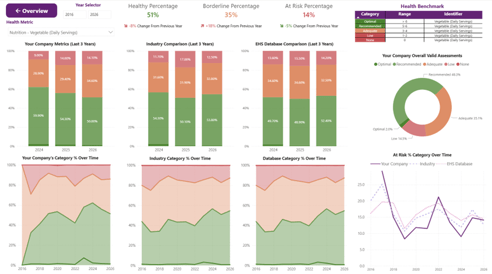
This section presents the dietary and alcohol consumption profile of individuals from your organisation who have undergone assessments. Data can be explored across key nutrition indicators including daily fruit, vegetable and wholegrain servings, as well as alcohol consumption measured by standard drinks per session. A year slicer is available to view dietary outcomes from a specific perspective.
Navigation
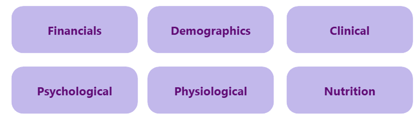
To move between the 7 sections, either use the tabs at the bottom of the window

or the tiles available in the Overview Page.
General Features
There are several features that are shared across all the sections of the dashboard.
Filters for Financial Section

Services: Select the health-related services delivered to your organisation.
Location: Select the service delivery location.
Year: Specify the date range for the financial data (E.g., 2018-2025).
Filters for Demographics Section
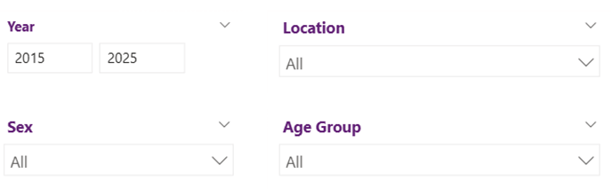
Year: Specify the date range for the demographic data (E.g., 2018-2025).
Location: Select the service delivery location of the health-related services.
Sex: Select the sex of the individuals who have undergone health-related services with EHS.
Age Group: Select the age group of the individuals who have undergone health-related services with EHS.
Filters for Health Sections (Clinical, Psychological, Physiological, Nutrition)
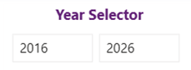

Year: Specify the date range for the health assessment data (E.g., 2018-2025).
Health Metric: Select the specific clinical, psychological, physiological or nutritional health metric to be analysed.
Key Financial Metrics Explained
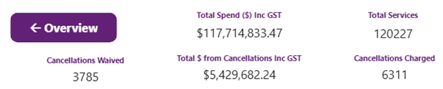
Total Spend ($) Inc GST: The total expenditure incurred by your organisation for the selected reporting period, inclusive of taxes.
Total $ from Cancellations Inc GST: The total expenditure incurred by your organisation for cancelled health assessments during the selected reporting period, inclusive of taxes.
Total Services: The total number of health assessments delivered to individuals within your organisation during the selected reporting period.
Cancellations Waived: The total number of eligible health assessment cancellations for which fees were waived by Executive Health Solutions during the selected reporting period.
Cancellations Charged: The total number of health assessment cancellations for which fees were incurred by your organisation during the selected reporting period.

Services Spend Breakdown (incl. GST) – Last 12 Months: A visual representation of the rolling 12-month expenditure, showing the distribution of spend across different health services inclusive of tax.

Total Services Spend (incl. GST): A visual representation of total expenditure for the selected reporting period, showing the distribution of spending across different health services, inclusive of tax.
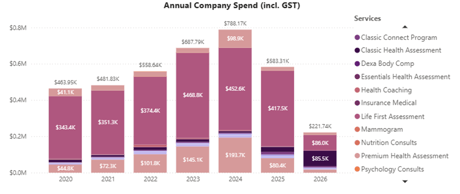
Annual Company Spend (incl. GST): A visual representation of total expenditure by year within the selected reporting period, showing the distribution of spend across different health services, inclusive of tax.
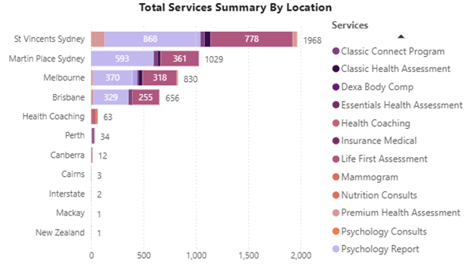
Total Services Summary By Location: A visual representation of the total number of health services delivered to your organisation, segmented by service delivery location for the selected reporting period.
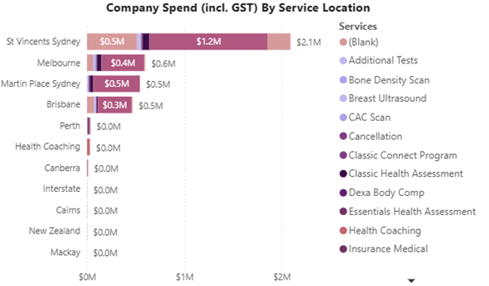
Company Spend (incl. GST) By Service Location: A visual representation of the total expenditure incurred by your organisation, segmented by service delivery location for the selected reporting period, inclusive of taxes.
Key Demographics Metric Explained

Overall Patient Attendance by Sex: A visual representation of the distribution of individuals from your organisation who have had health assessments segmented by sex for the selected reporting period.
Overall Patient Attendance by Age: A visual representation of the distribution of individuals from your organisation who have had health assessments segmented by age group for the selected reporting period.
Overall Patient Attendance by Location: A visual representation of the distribution of individuals from your organisation who have had health assessments segmented by service delivery location for the selected reporting period.
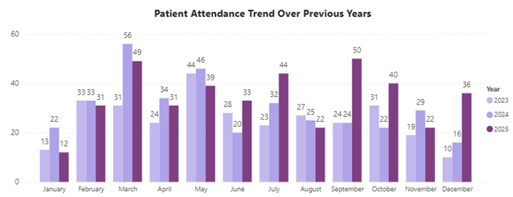
Patient Attendance Trend Over Previous Years: A visual representation of the monthly attendance of individuals from your organisation who have undergone health assessments across the previous 3 years within the selected reporting period.
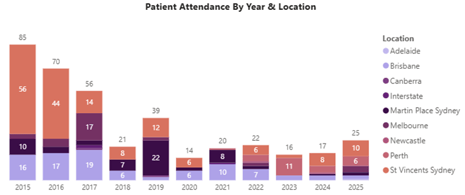
Patient Attendance By Year & Location: A visual representation of the yearly attendance of individuals from your organisation who have had health assessments segmented by service delivery location for the selected reporting period.
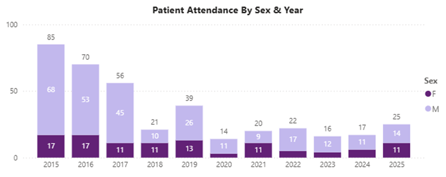
Patient Attendance by Sex & Year: A visual representation of the yearly attendance of individuals from your organisation who have had health assessments segmented by sex for the selected reporting period.
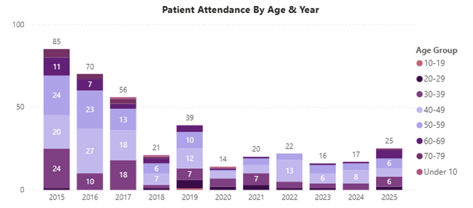
Patient Attendance by Age & Year: A visual representation of the yearly attendance of individuals from your organisation who have had health assessments segmented by age group for the selected reporting period.
Key Health Metrics Explained
Shared metrics between Clinical, Psychological, Physiological & Nutrition:
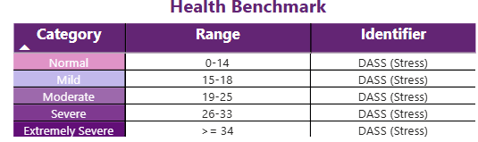
Health Category/Benchmark: Each health metric is associated with a relevant benchmark/category, which defines how individuals within your organisation are classified.

Healthy Percentage: A visual representation of the proportion of individuals whose health assessments fall within the category indicated by the label (shown by hovering over the metric), with the health category being visible in the top right corner of the dashboard. The percentage change reflects the difference between the two most recent years within the selected reporting period.
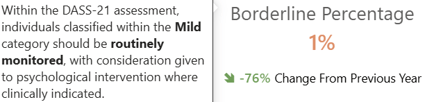
Borderline Percentage: A visual representation of the proportion of individuals whose health assessments fall within the category indicated by the label (shown by hovering over the metric), with the health category being visible in the top right corner of the dashboard. The percentage change reflects the difference between the two most recent years within the selected reporting period.
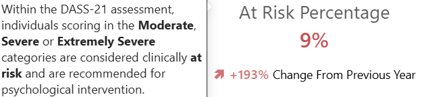
At Risk Percentage: A visual representation of the proportion of individuals whose health assessments fall within the category indicated by the label (shown by hovering over the metric), with the health category being visible in the top right corner of the dashboard. The percentage change reflects the difference between the two most recent years within the selected reporting period.
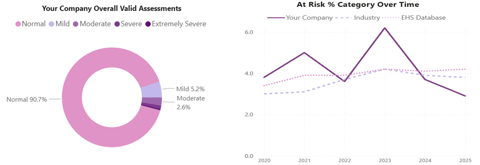
Your Company Overall Valid Assessments: A visual representation of individuals from your organisation who have completed health assessments, segmented by health categories for the selected reporting period.
At Risk % Category Over Time: A visual representation of individuals from your organisation who have completed health assessments and fall within the At-Risk health category for the selected reporting period. Results are broken down yearly and benchmarked against industry and database figures.
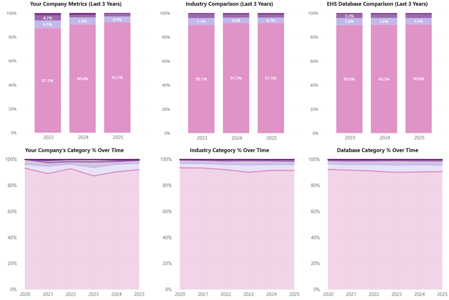
Your Company Metrics (Last 3 Years): A visual representation of individuals from your organisation who have completed the relevant health metric assessment, segmented by health categories across the last 3 years of the selected reporting period.
Your Company’s Category % Over Time: A visual representation of individuals from your organisation who have completed the relevant health metric assessment, segmented by health categories across the selected reporting period.
Industry Comparison (Last 3 Years): A visual representation of individuals within your organisation’s industry who have completed the relevant health metric assessment, segmented by health categories across the last 3 years of the selected reporting period.
Industry Category % Over Time: A visual representation of individuals within your organisation’s industry who have completed the relevant health metric assessment, segmented by health categories across the selected reporting period.
EHS Database Comparison (Last 3 Years): A visual representation of all individuals across the database who have completed the relevant health metric assessments, segmented by health categories across the last 3 years of the selected reporting period.
Database Category % Over Time: A visual representation of all individuals across the database who have completed the relevant health metric assessments, segmented by health categories across the selected reporting period.
Physiological Specific Metrics
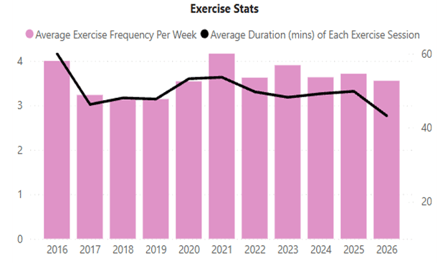
Exercise Stats: A visual representation of the average weekly exercise frequency and session duration (in minutes) for individuals within your organisation, enabling exploration of the correlation between exercise habits and VO2 Max scores.